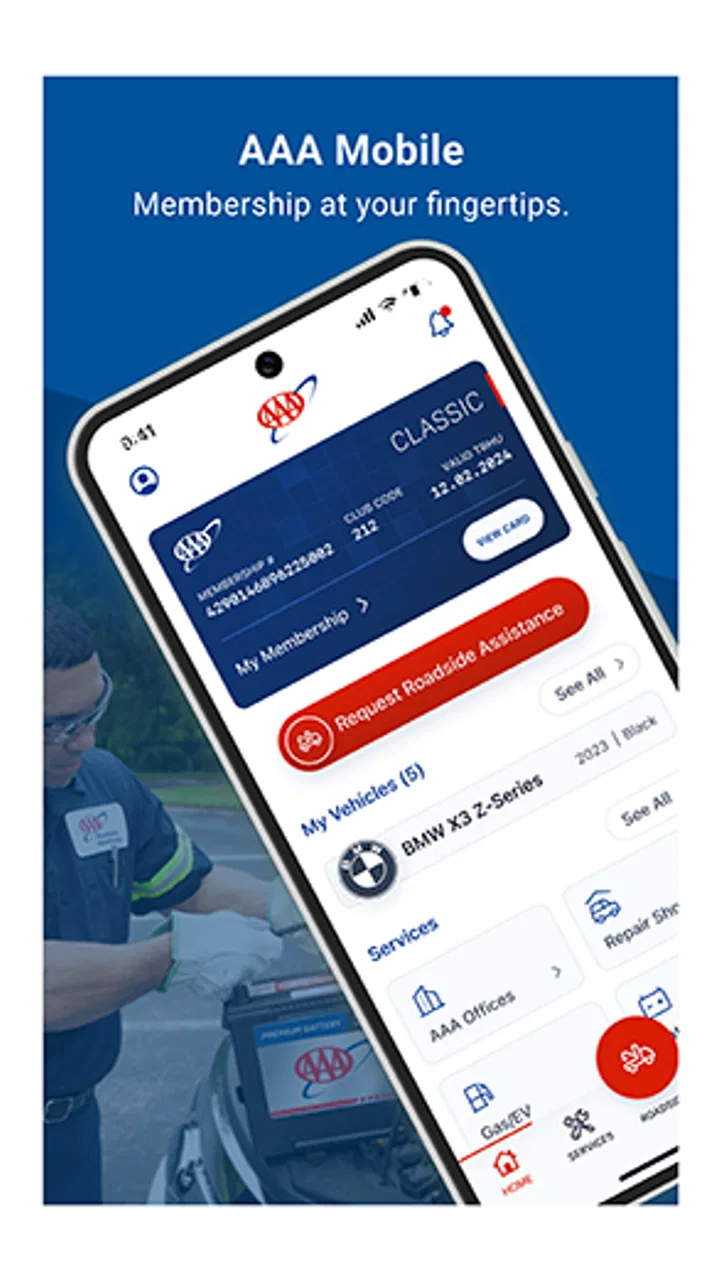
AAA Mobile
- 4.5
- Rating
- 10.00M
- Installs
- Free
- Price

 Analysis by App-foxy
I came away from AAA Mobile with the impression that it is most useful when I treat it as a roadside-planning companion rather than as a general travel app. It comes from American Automobile Association, Inc., and its purpose is to put familiar AAA services within reach when I am away from home. That sounds straightforward, but the value becomes clearer in the moments when I do not want to search several websites, make separate calls, or remember which service handles a particular problem.
This is a free lifestyle app for Android and iOS, rated for Everyone. It has been available since Aug 10, 2010, and its current version is 26.2.0. With an average rating of 4.6 from around 80 thousand ratings and over 10 million installs, it is clearly used by a large audience. I still would not install it simply because it is popular. The better question is whether I want AAA-related help organized in one mobile place, especially before or during a drive.
Where I found the most friction
The first point of friction is expectation. Someone opening the app may expect a full navigation replacement, a complete vehicle-management system, or an all-purpose emergency tool. I would not approach it that way. Its strongest role is access to AAA services on the go, so the experience makes more sense when I already know I am looking for assistance connected with driving, travel, or membership.
You May Also Like

 Blood Strike: 2.5 Anniversary
Blood Strike’s Loadouts Turn Every Drop Into a Tactical Gamble
A close look at Blood Strike’s custom loadouts: how fast access to signature weapons reshapes its battle royale rhythm, rewards preparation, and narrows the gap between fights.

 Pandora - Music & Podcasts
Pandora’s Music Is Easy to Start, but Harder to Recover
Pandora’s strength is its low-effort path from a seed to a station. Its weak spot is how much confidence it asks you to place in connection, setup, and quiet recovery.

 8 Ball Pool
 Is Built on Rivalries, Rematches, and Routine
A close look at the rivalries, rematches, shared routines, and unanswered safety questions that turn a quick pool match into a persistent mobile community.

 Samsung Music
’s Quiet Strength Is Playing What You Already Own
Its reach comes less from spectacle than from dependable access to a personal library. That simplicity is both the app’s strongest retention engine and its ceiling.

 AccuWeather: Weather Radar
AccuWeather Review: A Quick, Clear Forecast for Everyday Decisions
For everyday plans, the best forecast is the one you can understand quickly. AccuWeather makes rain timing, radar, and local conditions easy to act on, with a few trade-offs.

 Hill Climb Racing
Why Hill Climb Racing Still Turns Crashes Into One More Run
A tiny car, a bumpy hill and one more upgrade: Hill Climb Racing keeps resurfacing because its simple chaos makes every near-miss feel personal.
More From Our News Desk
View All News


That distinction matters during a stressful roadside situation. If my car will not start, I do not want to browse through unrelated lifestyle content or compare a long list of providers. I want to identify the relevant AAA service quickly, provide the information the app requests, and understand what happens next. Any delay caused by searching in the wrong area feels much bigger when I am standing beside a vehicle.
Another likely stumbling block is account context. AAA services can depend on the member, the vehicle, and the location, so I would expect the app to work best when my membership details are already available and my phone can determine where I am. If I open it for the first time during an emergency, I may spend valuable time signing in, checking details, or correcting an address. That is not necessarily a flaw in the app; it is a reason to prepare before a trip.
I also noticed the difference between having an app installed and being ready to use it. Installation alone does not guarantee a smooth roadside request. A phone with a nearly empty battery, weak mobile service, an outdated account detail, or an unclear vehicle description can create more trouble than the interface itself. My practical advice is to open AAA Mobile while everything is calm, look around the service areas, and make sure I understand the basic path before I need it.
What I would prepare before driving
I would begin by signing in at home rather than waiting until a breakdown. I would check that the account information is recognized and that I know which member profile I am using. If another person in my household may use the car, I would also make sure that person knows where the app is and how to reach the relevant service screen. This is a small step, but it avoids handing a locked phone to someone who has never used the app.
I would then confirm that the phone can provide a usable location. If I am in a parking garage, rural area, or stretch of road with poor reception, the app may not be able to make the process feel instant. I would keep a written description of the vehicle and its usual parking or travel details available as well. I am not suggesting that the app requires every one of these preparations in every situation; I am saying that they reduce the amount of typing and uncertainty when attention is already divided.
Finally, I would keep the application updated. The current version is 26.2.0, and using a recent release is a sensible first check whenever an app behaves unexpectedly. Updates can affect sign-in screens, service flows, and compatibility with the operating system. AAA Mobile supports Android from version 7.0 onward, which covers many devices, but a supported operating system does not remove the need to keep the phone itself in good working order.
Setup checks that save time later
My preferred setup routine is short. I install the app, open it on a reliable connection, sign in, and explore without submitting a service request. I pay attention to whether the app recognizes my account and whether the information it displays looks familiar. I also check that the phone has enough storage and battery for a trip. These are ordinary checks, yet they are often more useful than repeatedly reinstalling an app when the real issue is the device or connection.
I would avoid testing the app by entering a false emergency or incomplete request. A better test is simply navigating through the available service options and stopping before any final submission. This lets me learn the wording and layout without creating confusion for a real assistance workflow. If the app asks me to confirm information, I make a note of what I would need in a genuine situation: my location, a callback number, and a clear description of the problem.
Location is worth special attention. If I am requesting help from a highway shoulder, I would not rely only on a vague place name. I would look for a nearby exit, mile marker, street sign, or landmark and keep that information ready. A phone may locate me approximately, but a human responder may still need a precise explanation. The app can be a useful starting point without replacing my responsibility to describe where I am safely.
I would also review notification and phone settings in a general way. If the device blocks notifications, limits background activity aggressively, or silences calls from unfamiliar numbers, I may miss an update or callback even though the app itself is working. I would not change settings blindly. I would check them only if I notice that confirmations or communication are not appearing as expected.
A realistic roadside workflow
Imagine that I leave a grocery store and find that the car will not start. My first action is safety, not tapping through menus: I move away from traffic if possible, turn on hazard lights, and call emergency services if the situation is dangerous. Once I am in a safe position, I open AAA Mobile, sign in if needed, and look for the service that matches the problem. I provide the location as carefully as I can, describe the vehicle, and review the request before sending it.
At that point, I would keep the phone available and watch for the next instruction rather than closing the app immediately. If the screen appears to pause, I would first check whether the request actually went through before trying again. Duplicate submissions can create unnecessary confusion. I would also keep an eye on battery use and signal strength, because a roadside workflow is not the right time to discover that the phone cannot remain connected.
This scenario shows the app's practical strength: it gives me a familiar digital route to AAA help when I am away from a desktop. It also shows its limit. The app does not make the roadside situation safe by itself, and it cannot fix a dead phone, a blocked road, or a location that I cannot explain. I see it as one part of a sensible plan, alongside basic safety habits and a backup way to contact help.
Recovering when the workflow stalls
If AAA Mobile does not open correctly, I would use a simple order of checks instead of jumping straight to deletion. First, I would confirm that the phone has a connection by opening another trusted service. Then I would close and reopen the app, check for an available update, and restart the phone if the problem continues. These steps are unglamorous, but they separate a temporary device problem from an account or service problem.
If the app opens but does not recognize me, I would carefully recheck the sign-in details and avoid rapidly repeating unsuccessful attempts. I would make sure I am using the account associated with my AAA membership rather than a different email or profile on the device. If the issue remains, I would use the official support route available through AAA rather than relying on random troubleshooting advice from an unrelated website.
A request that seems stuck deserves a different approach from a failed login. I would look for an on-screen confirmation, message, or change in status before submitting again. I would note the time, location, and information already entered. If I need to contact support by another route, those details help me explain what happened without starting from zero. I would never assume that closing the app cancels a request or that repeating it is harmless.
Reinstalling can sometimes clear corrupted local data, but I would treat it as a later step. It may remove the convenience of an already prepared session and force me to sign in again. Before taking that route, I would check the connection, update status, device storage, and account details. If I am already waiting for assistance, I would prioritize maintaining communication over experimenting with the installation.
One useful habit is taking a screenshot of a confirmation when the phone is stable and doing so does not expose sensitive information unnecessarily. I would keep it only as long as needed and avoid sharing account or location details publicly. The point is not to create a permanent record of every trip; it is to preserve a reference if the screen changes, the connection drops, or I need to explain the request to support.
When the app is not the cause
It is easy to blame an app when a roadside request takes time, but several outside factors can be responsible. A weak signal may prevent a screen from loading. A crowded network may delay communication. A phone in extreme heat may slow down or shut off. A vehicle location under a bridge or inside a large structure may be difficult to identify accurately. In each case, the app may be functioning normally while the surrounding conditions make the experience feel broken.
I would also distinguish between a service delay and an interface failure. If I can submit information and receive a confirmation, the remaining wait may be related to availability, traffic, weather, or the distance to the vehicle. The app is a channel for requesting help, not a promise that assistance will appear immediately. If the situation is unsafe, I would contact emergency services rather than waiting for a lifestyle app to solve an urgent hazard.
There are situations where I would choose a different tool. For turn-by-turn navigation, a dedicated navigation app is usually the better choice. For comparing independent roadside providers, a broader marketplace may offer more options. For people who are not AAA members or do not expect to use AAA services, the app may provide little daily value compared with their existing contacts or vehicle manufacturer's assistance system.
That does not make AAA Mobile poor; it defines its audience. I would recommend it to an AAA member who drives regularly, travels with family, or wants a direct mobile route to familiar services. I would be less enthusiastic about installing it solely for general trip planning, entertainment, or comprehensive vehicle diagnostics. Its usefulness is concentrated, and that is preferable to pretending it replaces every automotive app.
How it compares with the usual alternatives
The usual alternative is keeping a phone number in contacts and calling when something goes wrong. That approach remains valuable, especially if the phone cannot open an app. AAA Mobile adds a more guided starting point and keeps the service relationship in a place I can reach while traveling. I like that combination, but I would still save an offline contact method because no app should be my only emergency option.
Another alternative is using a vehicle manufacturer's app. Those apps may be better for vehicle status, maintenance reminders, remote controls, or brand-specific support. AAA Mobile has a different appeal: it is tied to AAA services rather than to one vehicle brand. If I drive several cars, borrow a family vehicle, or want assistance that is not limited to a particular manufacturer, that distinction can matter.
Compared with a generic roadside marketplace, AAA Mobile feels more appropriate for someone who already trusts and uses AAA. A marketplace may be more flexible for shopping among providers, while AAA Mobile is more direct when my membership is the reason I am requesting help. I would choose based on the relationship I already have, not on the assumption that one app is universally superior.
Small habits that improve the experience
I would keep the app on the phone of the person most likely to drive, not only on the account holder's phone. Before a long trip, I would tell passengers who may need to help where the app is and what information they should have ready. This is particularly useful when the driver is busy, injured, or unable to handle the phone safely.
I would avoid using the phone while standing in an exposed position beside traffic. If I need to enter details, I would move to a safer location first or ask a passenger to help. The convenience of an app should never encourage unsafe roadside behavior. In my view, that is one of the most important practical trade-offs: speed matters, but safety matters more than completing a digital form immediately.
I would also review the app after a trip rather than leaving every permission and notification setting untouched forever. If I no longer need a setting, I can adjust it through the phone's normal controls. I prefer this measured approach to granting broad access without thinking, while still allowing the app to work as intended when I choose to use its services.
My practical verdict
After looking at the full workflow, I see AAA Mobile as a focused tool with a clear audience. It is free, available to Everyone, and developed by American Automobile Association, Inc. Its long availability since Aug 10, 2010, and its current 26.2.0 release suggest an established product rather than a temporary experiment. The large user base and 4.6 average also make it reasonable to consider, although my decision would still depend on whether I use AAA services.
The best reason to install it is preparedness, not novelty. I would set it up before a journey, verify the account, understand the service path, and keep a backup contact method. In a calm moment, it takes little effort to become familiar with the app. In a stressful moment, that familiarity can prevent me from wasting time looking for the right option or entering information repeatedly.
My reservations are equally practical. It is not the best replacement for navigation, independent provider comparison, or vehicle-specific controls. A poor connection, a depleted battery, or an account problem can limit its usefulness, and the app cannot remove the real-world delays involved in roadside assistance. Users who expect an instant fix from any mobile screen may be disappointed.
For an AAA member who drives often, I would recommend keeping AAA Mobile installed and preparing it before the next trip. For everyone else, I would first ask whether AAA services are part of their normal travel plan. If the answer is yes, this app offers a sensible digital front door. If not, a general emergency contact setup or a vehicle-focused app may be a better fit. My final view is positive, but specific: it earns space on my phone because it supports a real roadside workflow, not because it tries to be everything at once.
FAQs for AAA Mobile
01What is AAA Mobile and what features does it offer?
AAA Mobile is a comprehensive app designed to enhance your driving experience. It offers features such as roadside assistance, GPS navigation, and trip planning. Additionally, it provides access to exclusive discounts and deals at partner locations. Its user-friendly interface ensures that all services are easily accessible, making it a must-have for drivers.
02Is AAA Mobile available for both Android and iOS devices?
Yes, AAA Mobile is available for download on both Android and iOS platforms. You can find it on the Google Play Store for Android devices and the Apple App Store for iOS devices. Ensure your device meets the minimum system requirements for optimal performance.
03Does AAA Mobile require a subscription or membership to access its features?
While some basic features of AAA Mobile are available to all users, a AAA membership is required to access premium services like roadside assistance and certain discounts. Membership offers additional benefits, making it valuable for frequent travelers and drivers seeking comprehensive support.
04How does AAA Mobile ensure user privacy and data security?
AAA Mobile is committed to protecting user privacy and employs robust security measures to safeguard personal information. The app uses encryption to protect data during transmission and storage. Users are encouraged to review the app’s privacy policy for detailed information on data handling practices.
05What should I do if I encounter technical issues with AAA Mobile?
If you experience any technical difficulties with AAA Mobile, first ensure that you have the latest version installed. Check your device’s compatibility and internet connection. For further assistance, you can contact AAA’s customer support through the app or their official website to resolve any issues.
Pros
- Intuitive user interface for easy navigation.
- High-quality graphics enhance gameplay experience.
- Regular updates with new content and features.
- Engaging multiplayer mode increases replayability.
- Compatible with a wide range of devices.
Cons
- In-app purchases can be quite expensive.
- Occasional bugs disrupt the gaming experience.
- Requires a stable internet connection.
- Battery consumption is relatively high.
- Large app size may affect device storage.

AAA Mobile
Gallery